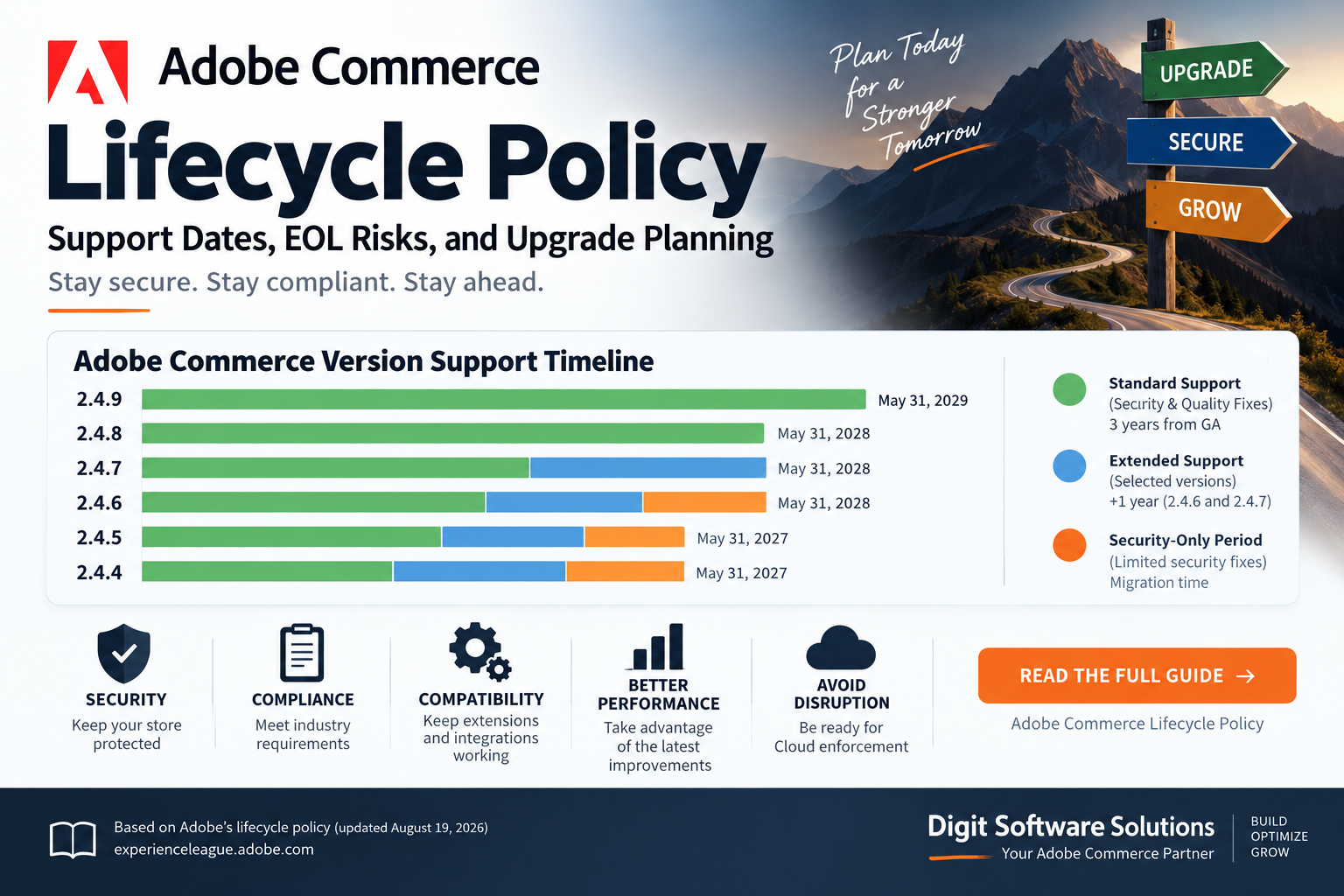
Adobe Commerce follows a defined software lifecycle that determines how long each release receives security updates, quality fixes, and Adobe support.
For Magento and Adobe Commerce merchants, understanding these dates is critical. Running an outdated Commerce version can eventually mean losing access to security fixes and quality patches, creating security and compliance concerns and making future upgrades more difficult.
Adobe’s current lifecycle policy provides a three-year standard support period from the General Availability (GA) date for each Adobe Commerce release.
What Is the Adobe Commerce Lifecycle Policy?
The Adobe Commerce lifecycle policy defines the support period for each Commerce release line.
During standard support, Adobe provides:
- Security patches
- Quality fixes
- Adobe Commerce support
- Security hotfixes for critical vulnerabilities
- Access to quality patches where applicable
Adobe’s standard support period lasts three years from the release’s GA date.
For merchants, this means that simply running a functioning Magento or Adobe Commerce store is not enough. The version running in production should also remain within its supported lifecycle.
Adobe Commerce Support Phases
Adobe’s current lifecycle policy can be divided into several stages.
1. Standard Support
Standard support lasts three years from the General Availability date.
It includes:
- Security fixes
- Quality fixes
- Full Adobe Commerce on-call support
- Critical security hotfixes for supported versions
Adobe provides security fixes through cumulative security patches and isolated security patch files during this period.
2. Extended Support
Adobe provides an additional support period for certain Adobe Commerce versions.
Currently, Adobe provides one additional year of support at no additional cost for Adobe Commerce 2.4.6 and 2.4.7.
This extension includes quality and security patches for the core Commerce application.
However, extended support should not be treated as a reason to postpone upgrade planning indefinitely.
3. Security-Only Transitional Period
Adobe has also introduced a one-time security-only transitional period for versions 2.4.4, 2.4.5, and 2.4.6 whose extended support ended in 2025 or 2026.
This period provides limited isolated security fixes but does not include quality fixes.
Adobe explicitly describes this as migration time rather than a long-term support tier.
Adobe Commerce Version Support Dates
According to Adobe’s lifecycle policy, the current support timeline is:
| Version | GA Date | End of Standard Support | End of Extended Support | Security-Only Period |
|---|---|---|---|---|
| 2.4.9 | May 12, 2026 | May 31, 2029 | TBD | N/A |
| 2.4.8 | April 8, 2025 | May 31, 2028 | TBD | N/A |
| 2.4.7 | April 9, 2024 | May 31, 2027 | May 31, 2028 | N/A |
| 2.4.6 | March 14, 2023 | August 11, 2026 | August 31, 2027 | May 31, 2028 |
| 2.4.5 | August 9, 2022 | August 12, 2025 | August 11, 2026 | May 31, 2027 |
| 2.4.4 | April 12, 2022 | April 12, 2025 | April 14, 2026 | May 31, 2027 |
These dates are from Adobe’s lifecycle policy updated August 19, 2026.
What Does This Mean in September 2026?
There are some important dates that Adobe Commerce merchants should pay attention to.
Adobe Commerce 2.4.9
Adobe Commerce 2.4.9 was released on May 12, 2026 and has standard support through May 31, 2029.
Adobe Commerce 2.4.8
Commerce 2.4.8 has standard support through May 31, 2028.
Adobe Commerce 2.4.7
Commerce 2.4.7 has standard support through May 31, 2027, followed by extended support through May 31, 2028.
Adobe Commerce 2.4.6
Standard support for 2.4.6 ended on August 11, 2026.
However, Adobe currently provides extended support through August 31, 2027, with a security-only transitional period through May 31, 2028.
This makes 2.4.6 an important version for merchants to review now.
Adobe Commerce 2.4.5
Extended support for 2.4.5 ended on August 11, 2026.
The security-only transitional period continues through May 31, 2027.
Adobe Commerce 2.4.4
Extended support ended on April 14, 2026, while the security-only transitional period continues through May 31, 2027.
Adobe Commerce Cloud: An Important Change
Adobe is introducing an enforced version upgrade policy for Adobe Commerce on Cloud.
According to Adobe, starting June 1, 2027, unsupported Commerce versions on Cloud will no longer be maintained. Adobe may take action to protect the security of the platform, including suspending traffic to affected infrastructure.
The currently published enforcement dates include:
| Commerce Version | Cloud Version Upgrade Enforcement |
|---|---|
| 2.4.7 | June 1, 2028 |
| 2.4.6 | June 1, 2028 |
| 2.4.5 | June 1, 2027 |
| 2.4.4 | June 1, 2027 |
Merchants running Adobe Commerce Cloud should therefore treat lifecycle dates as an operational requirement, not simply documentation to review when an upgrade becomes convenient.
Your PHP Version Matters Too
Updating Adobe Commerce alone is not enough.
Your underlying technology stack also needs to remain supported.
Adobe specifically highlights PHP lifecycle concerns.
For example:
- PHP 8.1 reached end of life on December 31, 2025.
- PHP 8.2 reaches end of life on December 31, 2026.
Adobe notes that Commerce 2.4.4, 2.4.5, and 2.4.6 environments using PHP 8.1 can have PCI compliance implications, while Commerce 2.4.6 environments using PHP 8.2 need to plan for the end of 2026.
This is an important reminder that a Magento upgrade should be treated as a platform upgrade, not just a Composer version change.
Don’t Forget OpenSearch, Redis, RabbitMQ and Other Dependencies
Adobe’s lifecycle policy also makes an important distinction between Adobe Commerce and third-party dependencies.
Adobe does not provide security or quality fixes for third-party services that reach their own end of life.
Depending on your Commerce version and architecture, these may include:
- PHP
- MariaDB
- MySQL
- OpenSearch
- Redis
- Valkey
- RabbitMQ
- Other infrastructure components
Merchants are responsible for maintaining supported versions of these dependencies.
For example, an application could technically be running a supported Commerce release while still relying on an unsupported PHP, database, cache, search, or message-queue version.
That can create a separate security and operational risk.
Why Staying on a Supported Version Matters
Running an unsupported Adobe Commerce release can create several problems.
1. Security Risk
Once a release leaves its applicable support period, merchants cannot rely on receiving normal security fixes for that release.
For ecommerce websites processing customer accounts, addresses and payments, this is particularly important.
2. Compliance Risk
Unsupported platform components can affect security and compliance assessments.
Adobe specifically highlights PHP end-of-life and its potential implications for PCI compliance.
3. Increasing Upgrade Complexity
The longer a store remains on an old Commerce version, the more likely it is to accumulate:
- Custom modules
- Outdated third-party extensions
- Theme modifications
- Deprecated APIs
- Custom checkout changes
- Legacy integrations
- Unsupported infrastructure components
This can turn a relatively manageable upgrade into a larger migration project.
4. Operational Risk
Cloud merchants have an additional consideration because Adobe has introduced version enforcement for unsupported Commerce environments.
How to Plan an Adobe Commerce Upgrade
A good upgrade should begin well before the official end-of-support date.
I recommend breaking the process into several stages.
Step 1: Identify Your Current Version
Run:
php bin/magento --versionAlso check:
composer show magento/product-community-editionor, for Adobe Commerce:
composer show magento/product-enterprise-editionStep 2: Audit Your Extensions
Create an inventory of:
- Adobe Commerce modules
- Third-party extensions
- Custom modules
- Payment integrations
- Shipping integrations
- ERP integrations
- Tax integrations
- Marketing integrations
- Search integrations
Verify compatibility with your target Commerce version.
Step 3: Review Your Infrastructure
Check:
- PHP
- Database
- OpenSearch
- Redis / Valkey
- RabbitMQ
- Nginx
- Varnish
- Elasticsearch/OpenSearch configuration
- Composer
- Node.js where applicable
- CDN/WAF configuration
- Cloud infrastructure
Step 4: Review Customizations
Pay particular attention to:
app/code- Custom themes
- Plugins
- Observers
- Preferences
- API integrations
- Checkout customizations
- Cron jobs
- Admin customizations
Step 5: Test in a Staging Environment
Never treat the production upgrade as the first complete test.
A proper staging cycle should include:
- Composer dependency update
- Database upgrade
- Static content deployment
- Reindexing
- Cache validation
- Checkout testing
- Payment testing
- Shipping testing
- Customer account testing
- Admin testing
- API testing
- Cron testing
- Search testing
Step 6: Plan the Production Deployment
Once testing is complete, prepare:
- Deployment plan
- Database backup
- Rollback strategy
- Maintenance window
- Monitoring
- Functional test checklist
Should You Upgrade or Migrate?
The answer depends on your environment.
Adobe currently identifies Adobe Commerce as a Cloud Service as its recommended long-term destination for Adobe Commerce on Cloud customers.
For merchants that are not ready to migrate, upgrading to a supported Adobe Commerce release remains an alternative path.
However, upgrading does not eliminate future lifecycle obligations. Cloud customers will still need to move between supported release lines as those versions approach their enforcement dates.
A Practical Upgrade Strategy
For an existing Magento or Adobe Commerce store, I recommend maintaining a simple lifecycle matrix:
| Area | Current | Target | Status |
|---|---|---|---|
| Adobe Commerce | 2.4.x | Supported release | Review |
| PHP | 8.x | Supported PHP | Review |
| Database | MySQL/MariaDB | Supported version | Review |
| Search | OpenSearch | Supported version | Review |
| Cache | Redis/Valkey | Supported version | Review |
| Queue | RabbitMQ | Supported version | Review |
| Theme | Luma/Hyvä/Custom | Compatible | Review |
| Extensions | Various | Compatible | Review |
| Payment | Various | Compatible | Review |
| CDN/WAF | Various | Compatible | Review |
| Custom modules | Various | Tested | Review |
This makes it easier to identify lifecycle risks before they become production problems.
Final Thoughts
Adobe Commerce lifecycle management should be part of every ecommerce team’s ongoing maintenance strategy.
The key point is simple:
Don’t wait until your Adobe Commerce version reaches end of support before starting the upgrade.
As of September 2026, merchants running 2.4.4, 2.4.5, or 2.4.6 should have a clearly defined upgrade or migration plan, while merchants on 2.4.7 and 2.4.8 should also plan their next upgrade rather than waiting until the end of the support window.
The latest Adobe lifecycle information should always be checked before planning an upgrade because support dates and enforcement requirements can change.
Official Adobe documentation:
Adobe Commerce Lifecycle Policy
Related: Check Adobe’s released versions documentation for individual patch and security release information.
Need Help With an Adobe Commerce Upgrade?
If your Magento or Adobe Commerce store is running an older release, an upgrade assessment can help identify compatibility, security, extension, infrastructure, and deployment risks before starting the migration.
For Adobe Commerce / Magento upgrade, migration, Hyvä, performance, or architecture consulting, contact us.